
Table of contents
- Platform comparison at a glance
- SuperOps: Modern automation for smaller MSPs
- Syncro: Best for MSPs who want everything in one system
- ConnectWise: Best for established MSPs who need deep customization
- Datto: Best for MSPs already using Datto backup appliances
- NinjaOne: Best for MSPs who want dedicated endpoint management
- Atera: Best for MSPs managing thousands of endpoints
- How to choose the right MSP platform
- Get unified MSP management with Syncro
- Frequently Asked Questions
TL;DR: Choosing between SuperOps and other MSP platforms depends on your service delivery model, team size, and stack architecture. SuperOps offers solid automation for smaller MSPs, but platforms like Syncro provide native PSA/RMM integration with direct database connections between ticketing, billing, and monitoring. The critical decision is whether you’re willing to manage API integrations and data sync between separate systems or prefer a unified platform where ticket-to-invoice workflows happen automatically without middleware.
If you’re looking at SuperOps alternatives, you’ve probably hit a wall somewhere. Maybe billing is a mess. Maybe you’re spending too much time fixing broken integrations. Or you just don’t want to pay someone to babysit your PSA anymore.
All these platforms do the same basic stuff: tickets, monitoring, and billing.
What matters is how much work you have to do to keep them running.
Some make you wire together three different systems through APIs that break every few months. Others just work because everything’s in the same database. Pick based on whether you want options or you want things to work without thinking about them.
Platform comparison at a glance
| Platform | Best For | Pricing Model | Native PSA/RMM | Setup Time | Key Strength |
| SuperOps | Smaller MSPs wanting modern UI | Per-technician | Partial (needs integrations) | Hours | Clean interface |
| Syncro | MSPs tired of managing integrations | Per-technician | Yes (shared database) | Hours | Everything in one system |
| ConnectWise | Established MSPs with complex needs | Per-technician (separate products) | Yes (requires integration) | Weeks | Unlimited customization |
| Datto | MSPs with Datto backup | Per-device | No (separate products) | Days | Backup integration |
| NinjaOne | MSPs with existing PSA | Per-technician | No (RMM only) | Days | Endpoint management speed |
| Atera | MSPs managing thousands of endpoints | Per-technician | Yes | Hours | Predictable pricing at scale |
SuperOps: Modern automation for smaller MSPs
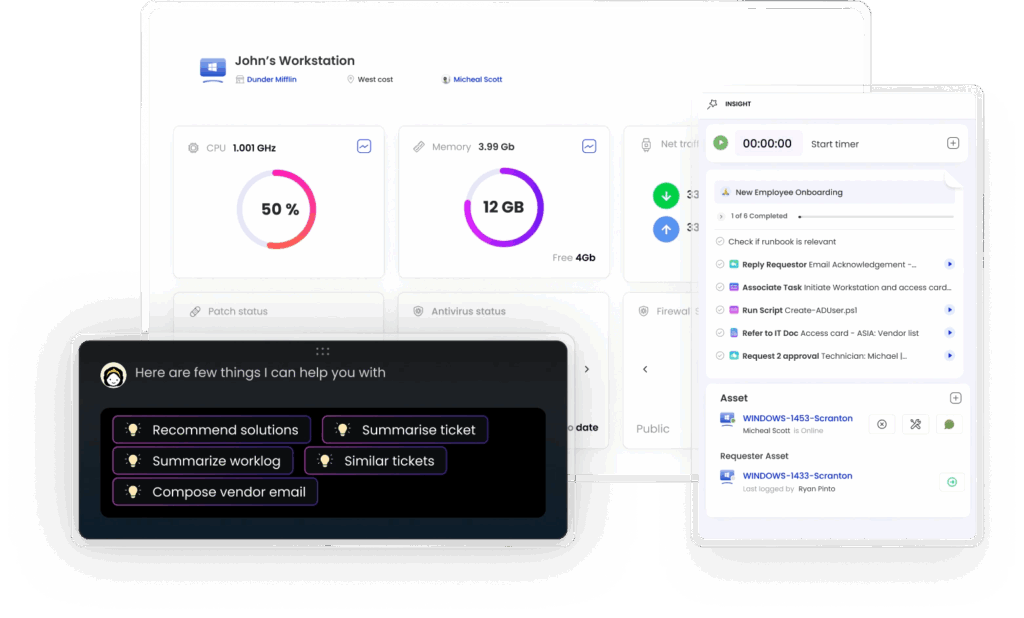
SuperOps bills itself as a modern PSA/RMM platform designed specifically for managed service providers who want automation without complexity.
Overview
SuperOps combines ticketing, documentation, client management, and remote monitoring in a single interface. Their automation engine handles routine tasks like ticket creation from monitoring alerts, patch deployment schedules, and client onboarding workflows. The card-based interface displays information in digestible chunks, and built-in templates help new users get started without building complex workflows from scratch.
Pros
- Modern, intuitive interface that’s easier to learn than legacy platforms
- Strong automation for routine MSP tasks
- Quick setup with pre-built templates for common services
- Branded client portal for service status and ticket submission
- Remote monitoring covers servers, workstations, network devices, and cloud infrastructure
Cons
- Requires third-party integrations for time tracking and advanced billing
- API connections need ongoing maintenance when platforms update
- Limited native asset management capabilities
- Workflows break when integrated systems change data structures
- Typically need to add Stripe, QuickBooks, and separate documentation tools
MSPs looking for native billing and time tracking might prefer platforms like Syncro that include these features without third-party dependencies.
Why get SuperOps
- You want a modern interface without ConnectWise’s complexity
- Your team is small and needs quick onboarding
- Pre-built automation templates match your service offerings
- You’re comfortable managing multiple tool integrations
- You prioritize clean UI over feature depth
Syncro: Best for MSPs who want everything in one system
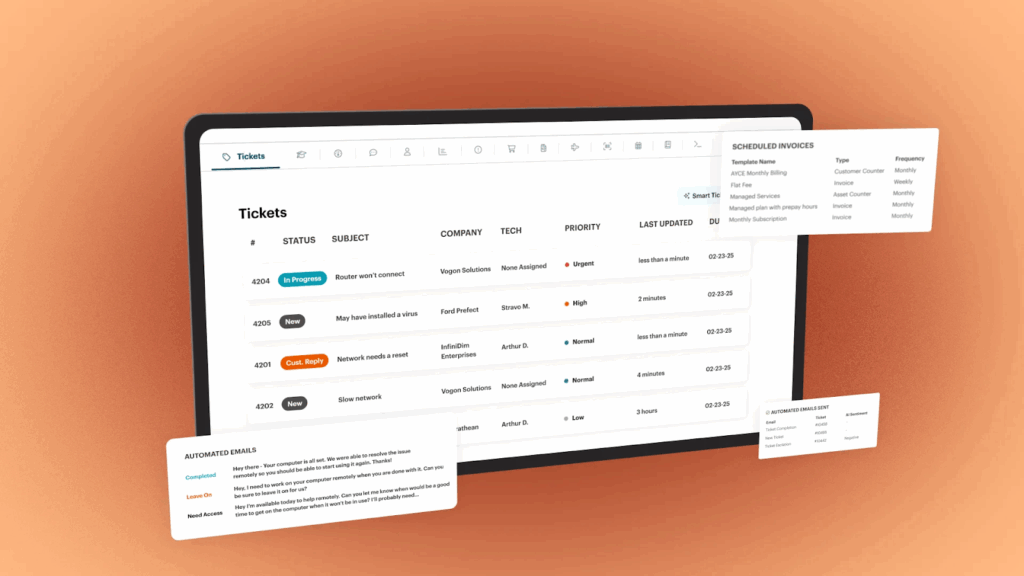
Syncro delivers PSA and RMM capabilities in a single unified platform designed specifically for small to medium MSPs.
Overview
Unlike tools that bolt together separate modules, Syncro builds all functionality on a shared database that eliminates synchronization issues between ticketing, monitoring, and billing systems. The platform handles endpoint monitoring, patch management, remote access, ticketing, time tracking, billing, and customer communication without requiring third-party integrations for core functionality. Install the Syncro agent on endpoints, and you immediately get visibility into system health, installed software, and performance metrics. Monitoring alerts automatically create tickets in the service desk.
Pros
- Everything runs on a shared database (no data sync issues)
- Native PSA/RMM integration without middleware
- Automatic time tracking feeds directly into billing
- QuickBooks integration handles accounting without duplicate entry
- Built-in screen recording for compliance documentation
- Microsoft 365 management directly in the platform
- Asset management tracks hardware and software automatically
- Per-technician pricing scales predictably
- Client portal branded to your company
Cons
- Unified design means less flexibility than modular systems
- Can’t swap out individual components if you prefer a best-of-breed approach
- Smaller ecosystem than ConnectWise (fewer third-party integrations)
- Not as customizable as enterprise platforms for complex workflows
- Focused on small-to-medium MSPs, not enterprise operations
Why get Syncro
- You’re tired of managing API integrations between separate tools
- Billing automation needs to happen without manual data transfer
- Your team is small and can’t babysit platform integrations
- Ticket-to-invoice workflows should work automatically
- You want Microsoft 365 management in the same tool as RMM
- Data living in multiple systems creates too many gaps
- Predictable per-technician pricing helps your planning
- You need to spend time delivering services, not fixing sync issues
ConnectWise: Best for established MSPs who need deep customization
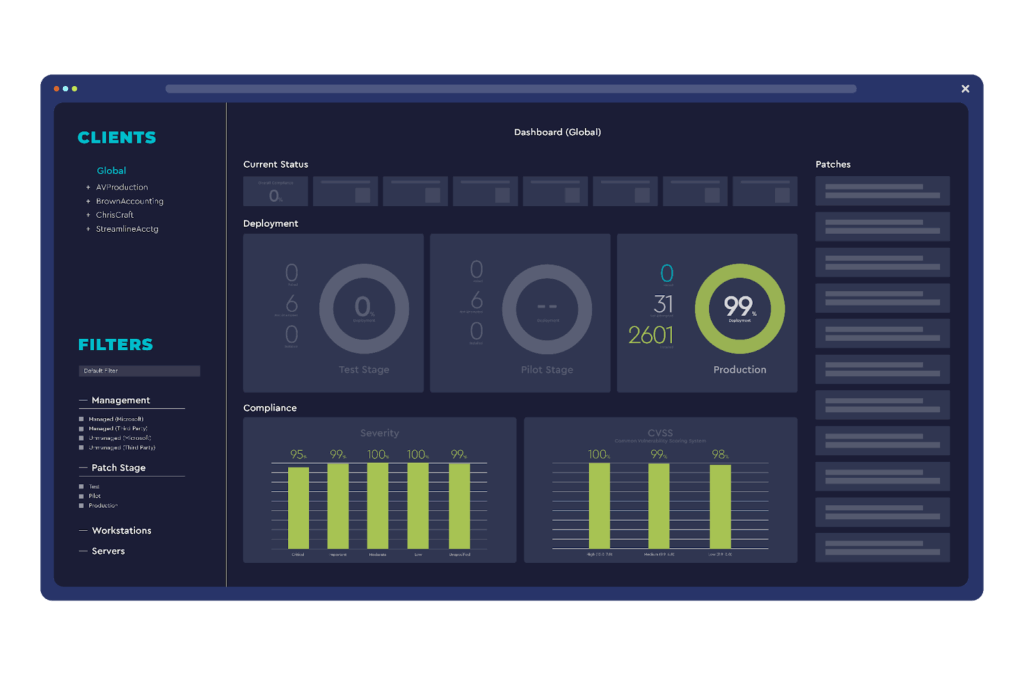
ConnectWise Manage and Automate have been the incumbent MSP solution for over two decades.
Overview
ConnectWise Manage (formerly ConnectWise PSA) handles ticketing, project management, time tracking, and procurement. Automate (formerly LabTech) provides the RMM component with agent-based monitoring, patch management, and script execution. The platform’s depth lets you configure almost any workflow imaginable, but requires significant setup time and ongoing maintenance. Many MSPs hire dedicated administrators or consultants to optimize their instance.
Pros
- Virtually unlimited workflow customization
- Over 300 vendor partnerships for integrations
- Enterprise-grade features for large MSP operations
- Mature platform with extensive documentation
- Deep functionality for complex business processes
Cons
- Steep learning curve (weeks for new technicians to get comfortable)
- Configuration changes create unintended consequences across modules
- Separate costs for Manage and Automate plus add-ons
- Requires dedicated admin or consultant fees for optimization
- High total cost of ownership including training and maintenance
Why get ConnectWise
- You’re an established MSP with complex workflow requirements
- You need enterprise-level features and integrations
- You can afford dedicated platform administrators
- Unlimited customization matters more than ease of use
- You’re already invested and switching costs are too high
- Your team has the technical skills to manage configuration dependencies
- You need deep PSA features like procurement and project accounting
Datto: Best for MSPs already using Datto backup appliances
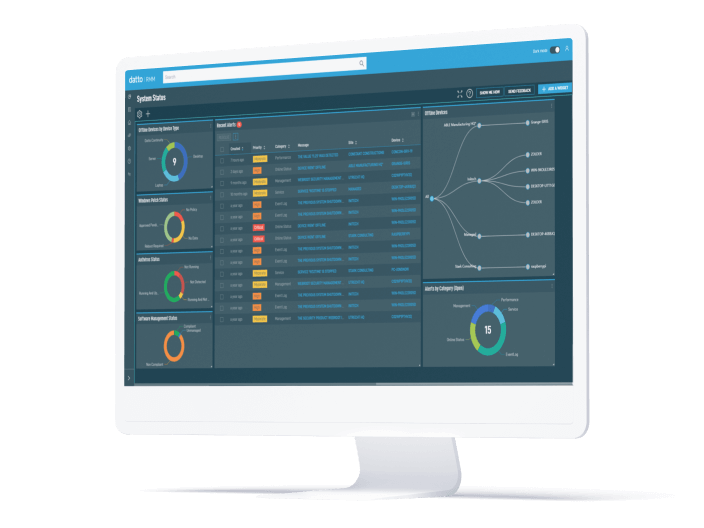
Datto RMM and Autotask PSA separate RMM and PSA functions into distinct products.
Overview
Datto RMM focuses exclusively on remote monitoring and management with agent deployment, patch management, network monitoring, and automated remediation. Autotask PSA handles service desk operations, project tracking, billing, and customer communication. The split gives you flexibility to run Datto RMM with a different PSA or vice versa, but managing two separate systems creates data synchronization challenges.
Pros
- Excellent Windows environment visibility and management
- Direct backup integration if you use Datto appliances
- Modular approach lets you pick best-in-class for each function
- Granular patch management and script execution
- Strong for MSPs with Datto backup as their differentiator
Cons
- Alert-to-ticket creation requires middleware or custom scripts
- Device data exists in both systems and syncs asynchronously
- Autotask interface feels dated compared to newer platforms
- Limited mobile access
- Reporting requires custom queries or purchased report packs
- Data sync issues create workflow gaps
Why get Datto
- You’re already running Datto backup appliances
- You want best-in-class RMM separate from your PSA
- Windows environments are your primary focus
- Direct backup status visibility matters for your service offerings
- You’re comfortable managing data sync between two systems
- You need flexibility to swap out RMM or PSA independently
- Backup integration is a key differentiator for your MSP
NinjaOne: Best for MSPs who want dedicated endpoint management
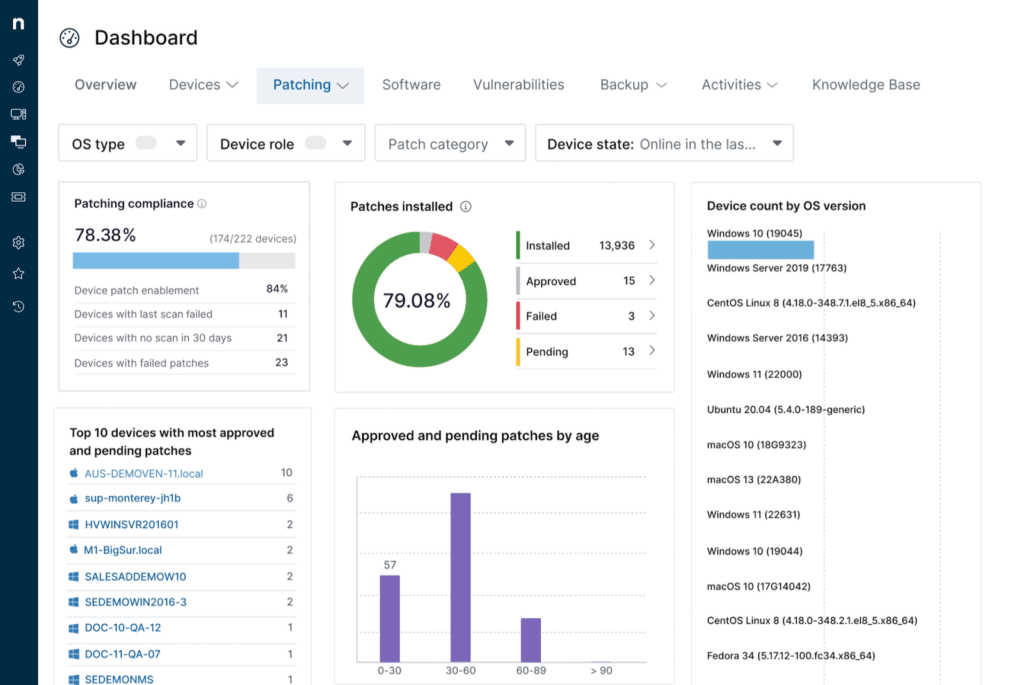
NinjaOne (formerly NinjaRMM) focuses exclusively on endpoint management without including PSA functionality.
Overview
NinjaOne monitors and manages devices but leaves ticketing, billing, and project management to other tools. The interface prioritizes speed and simplicity. Technicians can deploy agents, run scripts, and access endpoints in seconds. Bulk operations work smoothly for applying patches or making configuration changes across hundreds of devices simultaneously. NinjaOne assumes you’ll pair it with ConnectWise, Autotask, or another service desk platform.
Pros
- Extremely fast interface built for technician efficiency
- Outstanding patch management with automatic categorization by severity
- Handles Windows, Mac, and Linux with consistent policy enforcement
- Patch failures trigger automatic retry with detailed failure logs
- Remote access works through firewalls without port forwarding
- Documentation integration puts runbooks alongside managed systems
- Does one thing (endpoint management) extremely well
Cons
- No built-in PSA means you need a separate ticketing platform
- Requires integration work to sync with your service desk
- Bidirectional sync adds complexity if starting from scratch
- You’re managing two platforms instead of one
- Additional cost for PSA on top of NinjaOne licensing
Platforms like Syncro’s unified RMM and PSA eliminate this integration complexity by building everything on a shared database.
Why get NinjaOne
- You already have a PSA you love and just need better RMM
- Endpoint management speed matters more than all-in-one convenience
- You manage mixed environments (Windows, Mac, Linux) at scale
- Patch compliance reporting is important for your clients
- Your techs need to move fast across hundreds of devices
- You want best-in-class RMM without PSA bloat
- Documentation integration with IT Glue or Hudu is part of your workflow
Atera: Best for MSPs managing thousands of endpoints

Atera combines PSA and RMM in a single platform with per-technician pricing instead of per-device costs.
Overview
Atera handles standard MSP operations: ticketing, time tracking, billing, remote access, patch management, and monitoring. Nothing feels cutting-edge, but everything works reliably without requiring extensive configuration. New users can set up their instance and start managing clients within a few hours. The per-technician pricing model benefits MSPs managing thousands of endpoints because monthly costs stay predictable regardless of customer growth.
Pros
- Per-technician pricing keeps costs predictable as you add endpoints
- Quick setup (hours, not weeks)
- Splashtop remote access embedded directly in the platform
- Billing automation with direct Stripe integration
- Mobile apps handle common tasks from anywhere
- Works reliably without constant tweaking
- Good fit for straightforward MSP operations
Cons
- Limited customization for unusual workflows
- Native automation restricted to basic triggers and actions
- Advanced automation requires third-party tools like Zapier
- Opinionated workflows don’t bend much
- Not cutting-edge compared to newer platforms
Why get Atera
- You manage thousands of endpoints and per-device pricing hurts
- Quick setup matters more than deep customization
- You run standard MSP operations without complex workflows
- Predictable monthly costs help your financial planning
- Your team needs mobile access for alert response
- You want simple billing automation without separate accounting software
- You don’t need advanced workflow customization
How to choose the right MSP platform
Your business size, service delivery model, and existing tech stack all factor into platform selection. If you’re already deep into ConnectWise or Autotask, switching costs might outweigh the benefits. Starting fresh or consolidating tools? Look at total cost of ownership beyond monthly subscriptions.
Device count affects economics. Per-device pricing works for small MSPs but gets expensive at scale. Per-technician pricing makes sense when managing thousands of endpoints but can hurt small operations with high device-to-technician ratios. Syncro’s per-technician pricing includes unlimited endpoints, which simplifies cost planning as you grow.
Test integrations with real data during proof of concept. “Supports integration” often just means “has an API,” not “includes a maintained connector.” Check if integrations need paid tiers, extra licensing, or custom development. MSPs regularly discover that advertised integrations only sync one direction or need manual field mapping. Platforms with native PSA and RMM integration avoid these data sync issues entirely.
Match platform complexity to your team’s capabilities. ConnectWise gives unlimited flexibility but needs dedicated administration. Simpler platforms like Atera or Syncro trade customization for ease of use.
Windows-heavy clients work with any modern RMM. Mixed environments with Mac, Linux, or network infrastructure need platforms that handle those systems well. Watch agent resource consumption on older hardware, patch deployment success rates, and how the platform handles devices going offline mid-update.
Get unified MSP management with Syncro
Jumping between separate RMM, PSA, and billing platforms wastes time. Your data sits in multiple places that don’t sync properly. Syncro fixes this by building everything on a shared database.
Small MSP teams can’t afford to babysit integrations. With Syncro, you manage one system instead of three. Less configuration complexity. Less admin overhead. More time delivering services.
Ready to see how Syncro streamlines MSP operations without sacrificing functionality?
Start your free trial and see how managing clients, endpoints, and billing from one platform actually works.
Frequently Asked Questions
While SuperOps offers a modern UI and solid automation, it typically requires third-party integrations for native billing, time tracking, and advanced documentation. MSPs often choose Syncro because it delivers native PSA/RMM integration where automatic time tracking and ticket-to-invoice workflows happen seamlessly on a shared database, eliminating these third-party dependencies and integration headaches.
Unified platforms like Syncro build all core functionality—PSA, RMM, time tracking, and billing—on a single, shared database. This eliminates data synchronization issues, broken API connections, and the need for middleware between systems. Modular platforms require you to integrate separate products, which often leads to higher administrative overhead and workflow gaps.
While ConnectWise offers seemingly unlimited workflow customizations and enterprise-grade features, this flexibility comes with a steep learning curve, separate costs for its PSA and RMM components (Manage and Automate), and often requires a dedicated administrator or consultant for optimization.
For MSPs who prioritize a unified platform with powerful features and a faster time to value, Syncro offers a solution that eliminates this complexity. While it provides deep functionality, its single, shared database design significantly reduces the administrative overhead and steep learning curve associated with managing ConnectWise’s separate, integrated modules.
Syncro offers the most seamless integration because it is a unified platform where the PSA (ticketing, billing) and RMM (monitoring) are built on a single, shared database. This is a crucial distinction from alternatives like ConnectWise (which requires integration between separate products) or NinjaOne (which is RMM-only and requires a separate PSA). Syncro’s ticket-to-invoice workflows happens automatically without manual data transfer or integration maintenance.

Share
Related Resources