Table of contents
Backup automation means building verification loops that catch failures before your clients notice—and before those failures turn into data loss incidents that cost you SLAs, credibility, and sleep.
Most MSPs automate the backup job itself but still manually check whether backups are actually completed, whether they are restorable, and whether storage is approaching limits. But that should not be confused with automation—that’s just scheduled execution with a manual QA layer. Real backup automation closes the loop between execution, verification, and remediation so your team never checks dashboards every morning.
The gap between “backups are running” and “backups are verified and restorable” is where most MSPs lose time. You spend hours each week spot-checking backup logs across clients, or you trust that no news is good news until a restore request reveals a three-month gap in viable backups. Both approaches fail to scale, and both create risks you should not be carrying.
In this guide, we cover:
- Common reasons MSPs still manually verify backups and how to eliminate that overhead
- Systems that detect backup failures and corrupted files before restore requests
- Steps to configure backup monitoring that integrates with your existing RMM
- Proven workflows that reduce weekly backup management from hours to minutes
- Which automation capabilities justify their cost through time savings and risk reduction
Backup automation for MSPs: How to eliminate manual monitoring
Manual backup monitoring happens because most MSPs treat their backup solution and their RMM as separate systems.
You run backups through one platform, then log into another dashboard to verify they completed. This separation forces someone on your team to manually reconcile what ran versus what succeeded, which turns backup verification into a daily checklist item that never goes away.
Integration requirements for automated monitoring
Eliminating manual monitoring requires integration at the data layer, not just alert forwarding. Your RMM needs direct access to backup job status, completion metrics, and failure logs without requiring a human to pull reports. API connections feed backup telemetry into your existing monitoring infrastructure, where it gets evaluated alongside disk space, service health, and system performance.
Why verification logic matters more than completion alerts
The verification layer is where most automation attempts break down. Getting an alert that a backup job started is worthless. Getting an alert that a backup has completed is marginally better. Getting an alert only when a backup fails, includes corrupted files, or shows degrading performance trends—that eliminates manual monitoring. Your automation needs conditional logic that understands the difference between “job ran” and “backup is viable for restore.”
Predictive storage monitoring prevents backup failures
Storage monitoring prevents most backup failures before they happen. When your automation tracks storage consumption rates and projects when capacity will be exhausted, you get a warning to provision more space or rotate older backups. Without this predictive layer, you wait for backups to fail due to insufficient storage, then react after you have already missed backup windows.
The goal is to reduce your backup management to exception handling.
Your team should only touch backup systems when automation surfaces an actual problem requiring human intervention—not to verify that everything worked as expected. When verification becomes automated and alerts become actionable, you have eliminated manual monitoring without eliminating oversight.
Why automated backup verification catches failures before clients do
The time between a backup failure and a restore request is where reputations get destroyed. When a client needs to recover data and discovers their backups have been failing for weeks, the conversation shifts from “can you fix this?” to “why were we paying you to monitor backups that were not working?”
Manual verification creates gaps by design. You check backup status once daily, maybe weekly, for stable clients. But backup failures do not wait for your review schedule. A failed backup on Monday afternoon stays failed until Thursday morning when someone checks the dashboard. By then, you have missed multiple backup windows, and your restore point is days old instead of hours.
Automated verification closes the detection gap
Automated systems check backup completion within minutes of each job finishing. When a backup fails at 2 AM, your system knows by 2:15 AM and routes an alert before business hours start. Real-time detection means you can retry failed jobs, investigate issues, and restore backup coverage before the client ever knows there was a problem.
The difference between detecting a failure in 15 minutes versus 72 hours is not just response time—it changes whether you are managing an internal operations issue or explaining a service failure to a client. Automated verification keeps backup problems internal to your MSP instead of escalating them into client-visible incidents.
Integrity validation prevents silent corruption
Completion alerts only tell you that a backup job finished, not whether the backup is actually usable. Automated integrity checks validate that backup files are not corrupted, that file counts match expectations, and that backup sizes align with normal patterns. Silent failures happen when jobs complete successfully but produce corrupted or incomplete backup sets that will fail during restore attempts.
When clients request restoration, they expect immediate recovery. Automated verification confirms that every backup you are counting on for disaster recovery has already been validated as restorable, eliminating the nightmare scenario of discovering backup corruption during an actual emergency.
Best practices for RMM backup automation and alert configuration
Getting backup automation right requires configuration that distinguishes signal from noise and catches problems before they violate service agreements.
These five practices separate functional backup automation from systems that actually prevent client-facing failures.
Configure backup alerts based on failure type, not just completion status
Most RMM backup alerts trigger binary outcomes—success or failure. Minor issues generate the same urgency as critical failures, creating noise.
Configure your alerts to distinguish between:
- Temporary failures that will self-resolve on retry (locked files, network timeouts)
- Permanent failures requiring immediate intervention (authentication errors, storage exhausted, corrupted repositories)
Route critical alerts to on-call techs and log minor failures for morning review. Your team responds to what actually matters, reducing alert fatigue.
Set backup verification schedules that match your RPO commitments
If you promise clients 24-hour recovery point objectives, your verification cannot run on 48-hour intervals. Align your automated verification frequency with the restore guarantees in your service agreements.
Daily backups need daily verification runs. Continuous backups need real-time integrity monitoring. When verification cadence matches client expectations, you catch failures within your contractual windows instead of discovering them after you have already violated SLAs.
Use storage threshold alerts with predictive lead time
Alerting when backup storage hits 95% capacity means you are already in failure territory—the next backup job will likely fail.
Configure storage alerts at 75% and 85% thresholds with consumption rate calculations that project when you will hit capacity. Your team gets 7-14 days of lead time to provision additional storage or rotate older backups before failures start. Predictive storage alerts turn reactive firefighting into planned maintenance.
Create client-specific alert policies for high-value accounts
Not all backup failures carry equal business risk. A failed backup for a client with redundant systems and weekly restore requirements is different from a failed backup for a client running a single server with zero redundancy.
Build alert policies that escalate high-priority client failures to multiple techs immediately while routing low-risk failures through standard ticket queues. Your automation should reflect which clients cannot afford backup gaps.
Test backup restore automation alongside your backup jobs
Verifying that backups complete successfully is insufficient—you need confirmation that those backups are restorable.
Configure automated restore tests that:
- Randomly select backup files for validation
- Perform test restores to isolated environments
- Validate file integrity and completeness
Run these tests weekly or monthly, depending on client risk profiles. When restore testing is automated, you discover backup corruption during routine validation instead of during actual disasters when clients are waiting for recovery.
Backup automation tools: Features that deliver real ROI for service providers
Backup automation only delivers ROI when it eliminates work your team currently does manually.
Features that sound impressive in demos but require constant maintenance just shift where you spend time without reducing total effort.
The automation that matters catches failures faster than manual checks, validates backup integrity without human review, and alerts you only when intervention is actually needed. Anything less means you are still babysitting backup systems instead of managing them strategically.
ROI comes from three capabilities:
- Real-time failure detection that alerts within minutes, not days
- Storage consumption forecasting to prevent capacity failures before backup windows are missed
- Automated restore testing that validates backup viability without requiring techs to perform manual restore drills
Most RMM platforms bolt backup monitoring onto existing infrastructure as an afterthought. You get basic completion alerts but lack the verification logic, predictive analytics, and remediation workflows that actually reduce management overhead.
Syncro builds backup automation into the core platform.
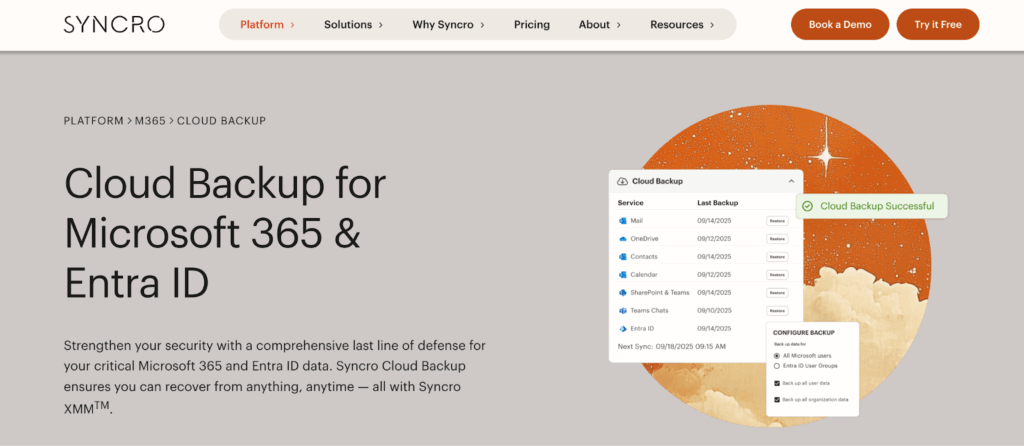
You get intelligent alerting that distinguishes temporary failures from critical issues, storage monitoring that projects capacity problems weeks in advance, and verification workflows that confirm backups are restorable without manual testing. Everything runs in the same interface your techs already use for ticketing, client management, and billing—no separate dashboards to check, no additional logins to manage.
When backup automation is integrated rather than bolted on, your team stops checking whether backups worked and starts handling only the exceptions that require attention. That shift from verification to exception handling is where the actual time savings appear.Stop checking backup logs manually.
Book a demo and see how Syncro Cloud Backup for Microsoft 365 & Entra ID automates backup verification, reducing your weekly backup management from hours to minutes.
Frequently Asked Questions
Backup automation goes beyond scheduled execution to include verification, monitoring, and remediation without manual intervention. Scheduled backups only initiate backup jobs at set times, while automation validates completion, checks file integrity, monitors storage capacity, and alerts you only when issues require attention. True automation eliminates the need to manually verify that backups completed successfully or are restorable.
Automated verification runs integrity checks that compare file counts, validate backup sizes against expected patterns, and flag anomalies that signal corruption. These checks happen immediately after each backup completes, catching silent failures where jobs finish successfully but produce unusable backup sets. Some systems also perform automated test restores to isolated environments, confirming that backup files can actually be recovered before you need them in an emergency.
Storage consumption rates and capacity projections are the most critical metrics for preventing backup failures. Monitor when storage will reach capacity based on current consumption trends, not just current usage percentages. Track backup completion times, job duration trends, and failure patterns across clients. Alert thresholds at 75% and 85% storage capacity give you 7-14 days to address issues before backups start failing due to insufficient space.
Most modern RMM platforms support backup automation through API connections that feed backup telemetry into your monitoring infrastructure. Integration quality varies—some platforms offer native backup monitoring with conditional alerting and remediation workflows, while others provide basic completion alerts that still require manual verification. Look for RMM solutions where backup status appears alongside other endpoint health metrics in a unified dashboard rather than requiring separate logins.
Verification frequency should match your recovery point objective (RPO) commitments in client service agreements. If you guarantee 24-hour RPOs, run verification at least daily. For continuous backup systems, implement real-time integrity monitoring that validates backups within minutes of completion. High-value clients with zero redundancy may require more frequent verification than clients with redundant systems and longer acceptable recovery windows.
Standard backup alerts notify you every time a job completes, creating noise that techs learn to ignore. Actionable alerts distinguish between temporary failures that self-resolve (locked files, brief network interruptions) and permanent failures requiring intervention (authentication errors, exhausted storage, corrupted repositories). Actionable alerts route critical issues to on-call techs immediately while logging minor issues for routine review, reducing alert fatigue and confirming teams respond to what actually matters.
Automation reduces backup management from daily verification tasks to exception handling. Instead of checking dashboards to confirm backups completed successfully, your team only touches backup systems when automation surfaces actual problems requiring human intervention. The shift eliminates 70-90% of routine backup management work—moving from hours spent spot-checking logs across clients to minutes spent addressing flagged issues. Time savings come from conditional logic that understands the difference between “job ran” and “backup is viable for restore.”
Syncro includes backup automation as a core platform feature rather than a bolted-on integration. The system provides intelligent alerting that distinguishes temporary failures from critical issues, predictive storage monitoring that forecasts capacity problems weeks in advance, and verification workflows that confirm backups are restorable without manual testing. Everything runs in the same interface techs use for ticketing and client management, eliminating context switching between separate backup dashboards and RMM platforms.

Share
Related Resources